


Have you ever had an idea for an online course but stopped yourself because creating the lessons, website, quizzes, and payment system felt overwhelming? I’ve tested hundreds of AI tools, and one thing I’ve noticed is that the best platforms are the ones that remove the friction between having an idea and actually launching it.
That’s where Thinkific stands out. Founded in Vancouver in 2012, Thinkific has grown into one of the most popular platforms for creators, educators, and businesses looking to turn their knowledge into online courses. In fact, Thinkific says more than 20,000 teams use its platform to create learning experiences and sell educational products.
In this Tinkific review, I’ll discuss the pros and cons, what it is, who it’s best for, and its key features. Then, I’ll show you how I tested Thinkific’s AI course creation tools to build a complete online course in just a few steps.
With so many course builders competing for your attention, picking the wrong one can cost you months of wasted setup time (and worse, lost revenue). That’s why I’ll finish the article by comparing Thinkific with my top three alternatives (Kajabi, Teachable, and Podia).
By the end, you’ll know which course creation tool is right for you!
Verdict
Overall, Thinkific is a great choice for creators, educators, and businesses that want an easy way to create, sell, and manage online courses with powerful learning tools. However, some key features are only available on higher plans, and you may need extra tools for more powerful marketing and customization.
Pros and Cons
- Create courses with a drag-and-drop editor that supports videos, text, audio, PDFs, quizzes, surveys, assignments, and student analytics.
- Add drip content, prerequisites, learning paths, certificates, and SCORM support (available on Plus plans).
- Sell courses with built-in checkout, subscriptions, payment plans, bundles, coupons, and tax management without the extra e-commerce software.
- Paid plans support unlimited students, and Thinkific doesn’t take a cut from your course sales.
- Build student communities and offer memberships to increase engagement and create recurring revenue.
- Use AI features to generate course outlines, create quizzes, and speed up the course creation process.
- Higher-tier plans offer branded mobile app options for a more professional learning experience.
- Thinkific Plus includes tools like SSO, group orders, APIs, and multi-site management for larger organizations.
- Thinkific’s email automation and CRM features are basic, so you may need third-party tools for advanced marketing funnels.
- The website and landing page templates look professional, but customization options can feel restrictive if you want a closely branded design.
- Many advanced features, including assignments, certificates, analytics, SCORM support, branded apps, multiple communities, etc., are only available on higher-tier plans or through additional add-ons, which can increase the overall cost.
- Thinkific helps you create and sell courses, but it doesn’t have a built-in marketplace to send you students.
What is Thinkific?
Thinkific launched in 2012 out of Vancouver and has grown from a simple course-hosting tool into what it now calls a full learning business platform: one place to create, host, and sell online courses, memberships, and digital downloads.
In a nutshell: rather than positioning itself as just an LMS, Thinkific frames its value around helping people turn knowledge into a sustainable, scalable business. That includes course creation, audience-building, and monetization all living under one roof instead of being stitched together from separate tools.
3 Core pillars: Courses, Community, and Commerce
Thinkific’s positioning centers on three pillars working together in one system:
- Courses: Build courses with a drag-and-drop editor that supports multimedia content, SCORM packages, drip scheduling, prerequisite lessons, live lessons, assignments, and AI course and quiz generation.
- Community: Thinkific does more than just deliver course content. It also helps you build a community where students can connect with each other and interact with you throughout the learning experience.
- Commerce: Built-in payments (through TCommerce), pricing and checkout tools, memberships, and revenue analytics, so you can sell your courses without the extra e-commerce software.
One thing worth noting: Thinkific’s entry-level Basic plan misses a lot of the platform’s standout features, like advanced analytics, paid memberships, and deeper customization options (like the HTML and CSS editor).
Also, there’s no free plan (only a 30-day free trial), and deeper analytics requires a more expensive tier. So the whole “all-in-one” pitch is strongest once you’re on a mid-to-upper plan rather than at the very bottom of the pricing ladder.
Who is Thinkific Best For?
Thinkific is best for creators, educators, and businesses that want an easy way to build, sell, and scale online courses without needing a full marketing platform.
- Experts, coaches, and consultants who want to turn their knowledge into online courses, memberships, communities, or digital products.
- Beginners looking for a user-friendly course builder with built-in tools to create, sell, and manage their content.
- Online academies and training companies that need advanced features like drip content, prerequisites, certificates, SCORM support, and tools for selling courses to teams or organizations.
- Businesses using online learning for employee onboarding, customer education, or training programs, especially those needing features like SSO, APIs, and advanced management controls.
- Creators who already use separate email marketing or CRM platforms and want Thinkific as a dedicated home for hosting courses, processing payments, building communities, and tracking performance.
Thinkific Key Features
Thinkific’s main features can be broken down into the following categories.
Course Creation & Learning Experience
- Easy drag-and-drop course builder for organizing chapters and lessons, with support for videos, text, audio, PDFs, downloadable files, surveys, and more.
- Create quizzes, exams, and assignments, then reward learners with branded certificates after they finish the course.
- Built-in AI tools help you generate course outlines, create quizzes, and use the AI teaching assistant (Thinker) to speed up course development.
- Course settings include SCORM support (available on the Plus plan), learning paths, lesson prerequisites, and drip content that can be released based on enrollment, course start dates, or a schedule you choose.
- Multiple teaching formats allow you to offer live Zoom classes, self-paced courses, cohort-based programs, or a combination of live and on-demand learning.
- Branded mobile app is available on higher-tier plans, giving students an app to access your courses on the go.
Communities, Memberships, and Additional products
- Built-in communities let students participate in discussions, share posts, and join events directly within the learning experience.
- Membership options allow creators to bundle courses, communities, and digital products into recurring subscription plans.
- Digital products and downloads (such as PDFs, guides, and other resources) can be sold alongside courses.
- Coaching and webinars for hosting live sessions and connecting with students in real time.
Website, Checkout, and Monetization (TCommerce)
- Create a branded online school with Thinkific’s website builder, which includes customizable templates, themes, sales pages, landing pages, and basic SEO.
- Built-in payments (TCommerce) includes its own payment and checkout system, allowing you to accept payments through options like Apple Pay and Google Pay, offer subscriptions, discounts, bundles, order bumps, gift purchases, and B2B payment options.
- Taxes and payment management helps automate sales tax and VAT collection, process refunds, and recover failed payments to make managing transactions easier.
Analytics & Student Management
- Sales and revenue tracking to monitor your earnings, recurring revenue, customer churn, and how well each product is performing.
- Student insights to track student progress, course completion rates, and engagement to see how learners are interacting with your content.
- Student management tools to organize enrollments, manage groups of students, handle seat licenses, and communicate with learners.
Integrations
- Connect Thinkific with popular tools for email marketing, automation, analytics, video calls, and more, including platforms like Kit, Zapier, and Zoom.
- Larger businesses can access custom integrations, single sign-on (SSO), and managing multiple sites through Thinkific Plus.
How to Use Thinkific
Here’s how I tested Thinkific’s AI course creation tools to build a complete online course in just a few steps:
- Start a Free Trial
- Generate a Course Outline with AI
- Choose a Landing Page Theme
- Customize the Landing Page Theme
- Edit the Course
- Add Interactive Quizzes
- Start Selling Your Course
Step 1: Start a Free Trial
Go to thinkific.com and start a free trial.
Step 2: Generate a Course Outline with AI

Rather than creating your course from scratch, use Thinkific’s AI Course Outline Generator to generate an organized curriculum seconds.
You can access the AI Course Outline Generator by going to “Products” and selecting “Courses.”

Select “Create a Course.”

Enter a prompt describing your course topic, target audience, and main goals.
For example, you can give it a prompt like this:
“A beginner-friendly guide to personal finance for college graduates, focusing on budgeting, saving, and basic investing.”

Within seconds, Thinkific creates a landing page along with a structured course outline featuring chapters and lessons already organized for you!
Step 3: Choose a Landing Page Theme

Choose one of the landing page themes at the top that suits your topic the most. From there, select “Customize your theme” at the bottom.
Step 4: Customize the Landing Page Theme

You can easily drag and drop sections in your site to reorder them, edit lesson titles, or remove any content that doesn’t fit your course.

Once you’re happy with how your landing page looks, you can add content to each lesson and create interactive quizzes.
Go to “Save” on the top right and then exit the editor by hitting the “X” on the top left.
Step 5: Edit the Course

To edit the course, open the menu on the top left (the hamburger icon) and go back to “Courses” under “Products.”
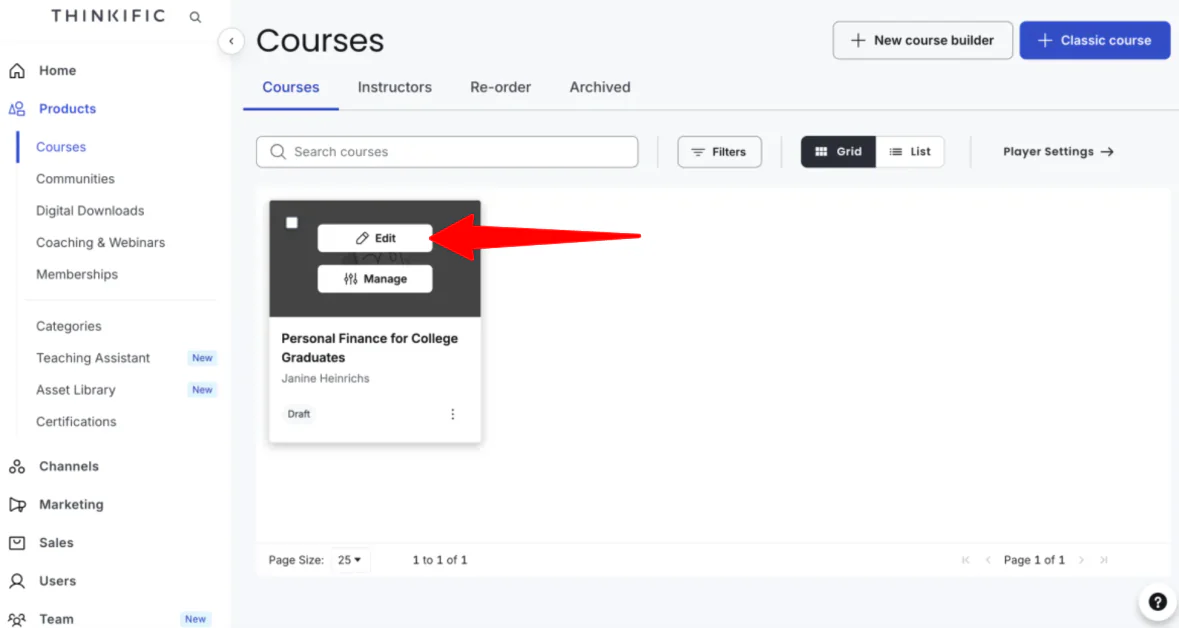
Hover over the course you just created and select “Edit.”

Here, you can view and edit, add, and rearrange content to each lesson (titles, videos, text, downloads).
Step 6: Add Interactive Quizzes

To add something at the end of a chapter (like interactive quizzes), select “Add lesson.” Click on “Quiz.”

Give it a title (like the chapter title followed by “Quiz” and choose your question count (up to 10). Select “Generate Questions.”

A few seconds later, Thinkific will generate questions based on your chapter topic.
If you’re happy with the questions, click “Accept and add to quiz.” If not, you can regenerate them until you get questions that fit your lesson.

Make sure to save the lesson at the bottom of the page. Your quiz will then be added to the end of the chapter in your course.
Step 7: Start Selling Your Course

To start selling your course, you need to make your landing page go live.
Access “Courses” within “Products” in the navigation bar.
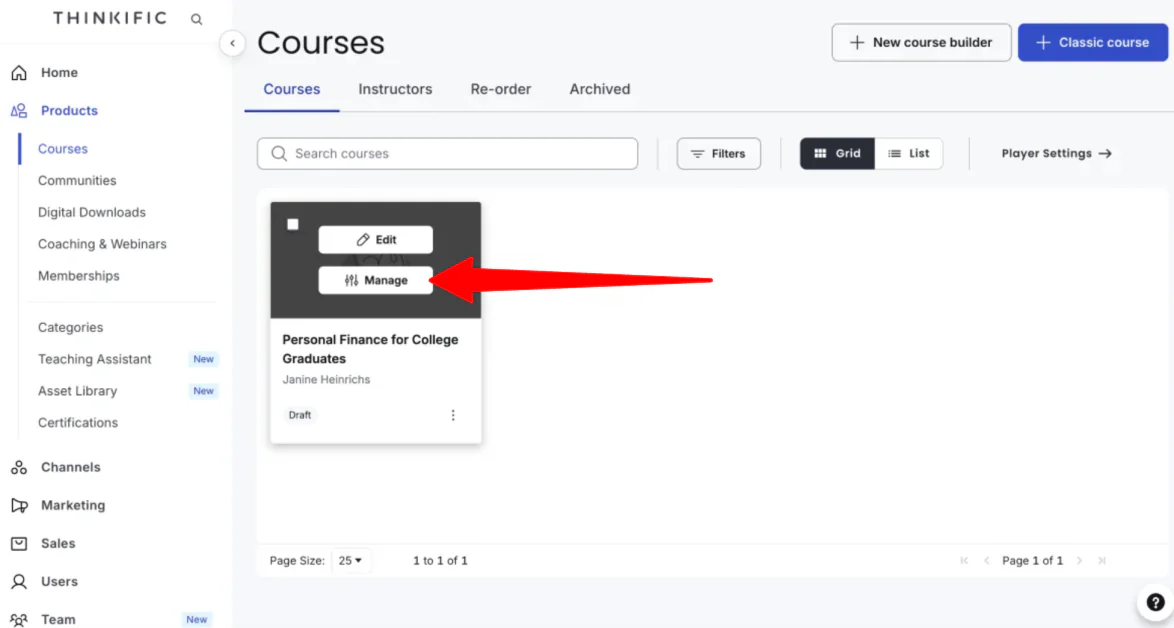
From there, hover over the course you want to publicize and go to “Manage.”

Edit the course content, manage the settings, and set the pricing (free, one-time payment, subscription/membership, or monthly payment plan).
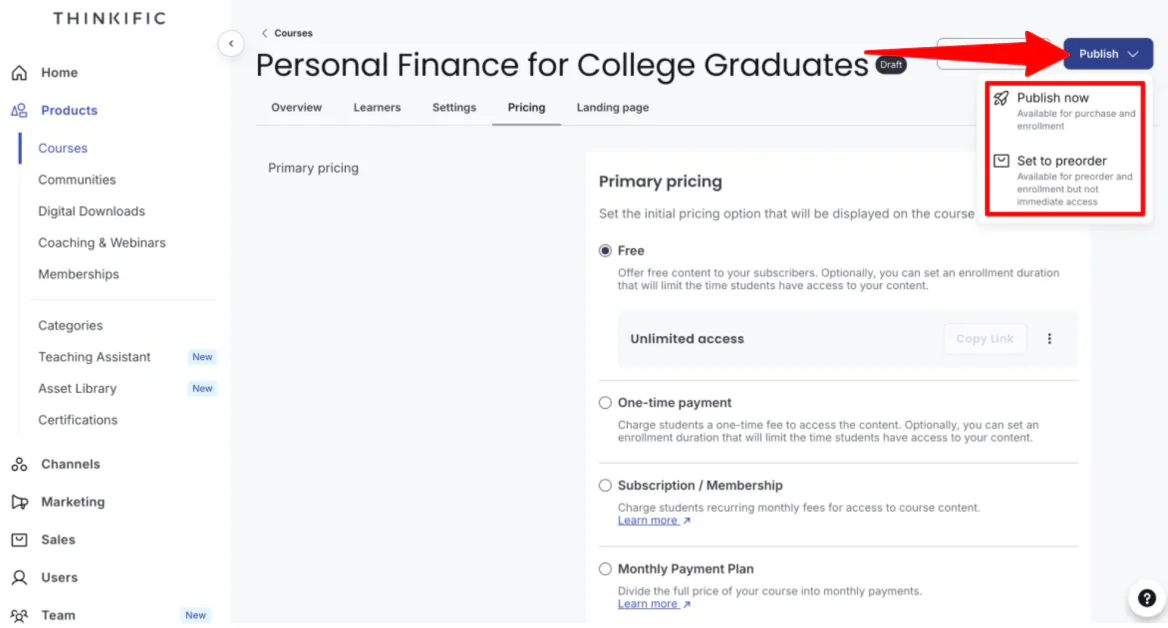
Once you’re happy with everything, publish immediately or set it to preorder.
Overall, Thinkific made the process of creating an online course feel surprisingly simple, especially with its AI course outline generator. I was able to quickly turn an idea into a structured course with a landing page, organized lessons, and interactive quizzes without building everything from scratch.
Top 3 Thinkific Alternatives
Here are the best Thinkific alternatives to consider if you’re looking for a different approach to creating, selling, and scaling online courses.
Kajabi
The first Thinkific alternative I’d recommend is Kajabi. It’s designed for creators, coaches, and entrepreneurs who want to build, sell, and grow a knowledge-based business with courses, memberships, communities, coaching programs, email marketing, and sales funnels all in one place.
Both platforms make it easy to create and sell online courses with features like course builders, memberships, communities, payment processing, and marketing tools.
However, Thinkific is more focused on learning experiences. It offers stronger course delivery features like quizzes, assignments, certificates, learning paths, prerequisites, and SCORM support. Meanwhile, Kajabi stands out with its broader business tools, combining courses with built-in email marketing, automation, landing pages, funnels, newsletters, and sales tools.
For creators who want a dedicated course platform with advanced learning features and room to scale, choose Thinkific. For entrepreneurs who want an all-in-one system to create products, market them, and manage their entire online business from one dashboard, choose Kajabi.
Teachable
The next Thinkific alternative I’d recommend is Teachable. It was made for creators, coaches, and businesses that want to create and sell online courses, coaching programs, memberships, and digital products.
Both platforms offer drag-and-drop course builders, built-in payment tools, AI features, quizzes, drip content, memberships, and tools to help creators monetize their expertise.
However, Teachable stands out with its focus on helping creators run their entire education business. It includes features like coaching products, digital downloads, automated tax handling, global payments, and a mobile app. The trade-off is a restrictive pricing structure: its Starter plan charges a 7.5% transaction fee and strictly caps you at 5 published products.
Meanwhile, Thinkific offers more advanced learning tools designed to support creators and businesses as they grow. On all of its paid tiers, you get 0% platform transaction fees (via Thinkific Payments), unlimited courses, and unlimited students. Thinkific also provides better design customization, SCORM support, and advanced tools for managing multiple sites through Thinkific Plus.
For creators who want an optimized checkout experience with hands-off global tax management, choose Teachable. For businesses and creators who prioritize no platform transaction fees, advanced learning features, and unlimited student growth, choose Thinkific
Podia
The final Thinkific alternative I’d recommend is Podia. It brings together online courses, communities, coaching, email marketing, events, and a website builder, so you can manage your business from one place.
Both platforms let you create and sell online courses, build communities, accept payments, and offer memberships, making them great options for creators and educators.
However, Podia stands out with its built-in email marketing, coaching, event hosting, and website tools, so you don’t have to rely on as many third-party apps.
Meanwhile, Thinkific is better for building more structured learning experiences with features like learning paths, assignments, certificates, SCORM support, detailed analytics, and enterprise tools for larger organizations.
Choose Podia for an all-in-one platform to run your creator business with courses, email marketing, coaching, and a website. Otherwise, choose Thinkific if your main focus is creating professional online courses or training programs with more advanced learning features.
Thinkific Review: The Right Tool For You?
After trying Thinkific, I can see why it’s one of the most popular online course platforms. The AI course outline generator saved me a lot of time by turning a simple idea into a structured course complete with lessons, a landing page, and even AI generated quizzes. I also liked how easy it was to customize the course, add new content, and prepare everything for launch without feeling overwhelmed.
Thinkific is a great choice if your main goal is creating high-quality online courses or training programs. While you’ll likely need separate tools for things like more advanced email marketing or sales funnels, its course-building features, built-in payments, and ability to scale make it an excellent option for educators, creators, and businesses alike.
But if Thinkific doesn’t feel like the right fit, here are the alternatives I’d recommend:
- Kajabi is best for entrepreneurs and creators who want an all-in-one platform with built-in email marketing, sales funnels, websites, and courses.
- Teachable is best for creators who want a simple way to sell courses, coaching, and digital products with built-in payment processing.
- Podia is best for solo creators looking for an affordable all-in-one platform with courses, coaching, email marketing, communities, and a website.
Thanks for reading my Thinkific review! I hope you found it helpful.
While there isn’t a free plan, Thinkific offers a 30-day free trial you can cancel whenever you want. Try it for yourself and see how you like it!
Frequently Asked Questions
What does the Thinkific do?
Thinkific is an online platform that lets you create, sell, and manage online courses, memberships, and communities. It also gives you control over your branding, custom domain, and student data without any coding experience.
Can you use Thinkific for free?
No, Thinkific no longer offers a free plan. Instead, you can try it with a 30-day free trial. After the trial ends, you’ll need a paid plan to keep your course live and start selling it.
Is Thinkific a legitimate platform?
Yes, Thinkific is a legitimate company used by thousands of creators, coaches, and businesses to create, sell, and manage online courses and communities.
Who is the CEO of Thinkific?
Thinkific was founded by Greg Smith, who serves as its CEO. Before creating the platform, he worked as a corporate and securities lawyer.
Is Thinkific a good platform?
Yes, Thinkific is one of the most popular platforms for creating, hosting, and selling online courses and communities. It’s user-friendly and doesn’t charge transaction fees, making it a great choice for educators and creators.
What are the disadvantages of Thinkific?
Thinkific’s main downsides are limited marketing tools and built-in email marketing, basic website customization, and some advanced features being locked behind higher-priced plans.
Which is better, Teachable or Thinkific?
Thinkific and Teachable are both popular course platforms, but they have different strengths. Thinkific offers unlimited courses on paid plans and no platform transaction fees. Meanwhile, Teachable emphasizes out-of-the-box checkout, payment processing, and monetization tools, with some product limits and transaction fees on lower plans.
